
Outlook message "Your email program is using outdated address information …"
June 8, 2016
Recent Posts
- From Excel Chaos to Automated Operations: How Power Apps Transformed a Field Service Business
- Power BI vs Excel: Which Reporting Tool Is Right for Your Business?
- Smarter Call Scheduling with Power Automate, SharePoint and Microsoft Teams
- We’re Heading to the Odoo Business Show in Birmingham: Here’s What We Want to Talk About
- Only One in Six UK Businesses Are Using AI. Is Manufacturing Falling Behind?
Want to make your Microsoft 365 work harder for your business?
and we’ll tailor a solution that’s just right for you.
When you try to send email from outlook and get an email saying “Your email program is using outdated address information for [email protected].” then don’t worry.
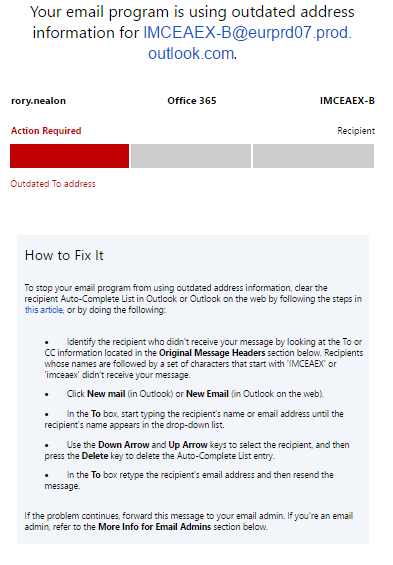
There can be following reasons for the same –
- The recent migration recipient email account
- Change in the SMTP details of recipient email id
In both the cases the solution is the same, just remove the auto memory of the outlook i.e. when you try to send an email from outlook, in To section (where you enter the recipient email id) outlook fetches the data and show you the auto saved details of the person
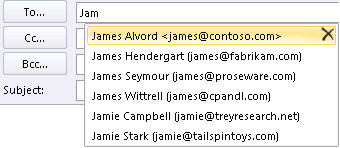
Click on X and remove it from the outlook memory and now sending the email & Eureka !! Your problem will be sorted.
Don’t forget to like and share our posts !!


 English (United States)
  English (UK)
  English (Ireland)
  English (India)