
Creation and deletion of a Ledger in SAP Business ByDesign
September 20, 2022
Recent Posts
- From Excel Chaos to Automated Operations: How Power Apps Transformed a Field Service Business
- Power BI vs Excel: Which Reporting Tool Is Right for Your Business?
- Smarter Call Scheduling with Power Automate, SharePoint and Microsoft Teams
- We’re Heading to the Odoo Business Show in Birmingham: Here’s What We Want to Talk About
- Only One in Six UK Businesses Are Using AI. Is Manufacturing Falling Behind?
Want to make your Microsoft 365 work harder for your business?
and we’ll tailor a solution that’s just right for you.
Creation of General ledger in SAP Business ByDesign is a piece of cake. But the system will not allow you to delete a ledger if there’s any ledger balance.
Listen to a demo of ByDesign by Target Integrations’ SAP Consultant, simply showing you how to create and delete Ledger.
To Create Chart of Accounts,
Go to General Ledger> chart of accounts > add new line.
From here you can create a new ledger with id code, description, and account type.
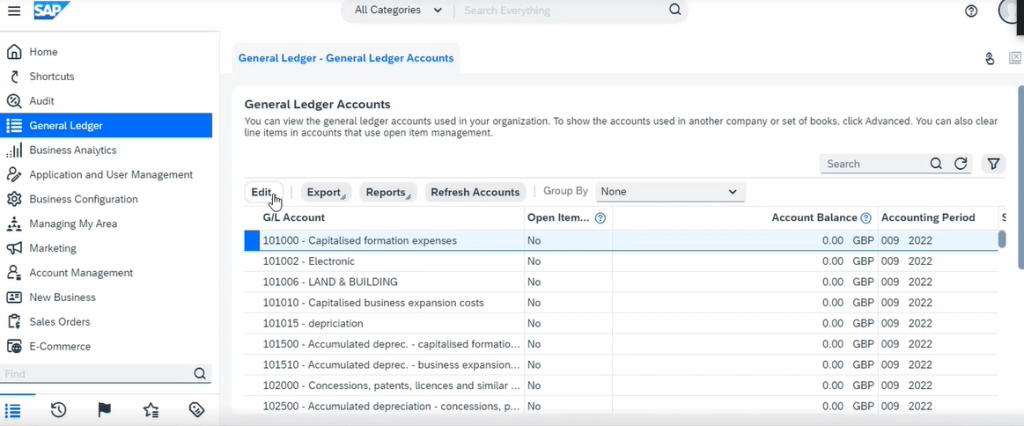
To delete account, first clear all ledger balances and delete the ledger and then save & refresh.
Target Integration has worked with various industries in the SMB sector. We have expertise in Supply chain and manufacturing business software implementation. We also provide support and training separately. Drop us a message or contact our experts to know further about SAP Business ByDesign.


 English (United States)
  English (UK)
  English (Ireland)
  English (India)