
Help customers quickly reorder products using Odoo
September 11, 2017
Recent Posts
- Lean Business: How to Reduce Waste and Build More Efficient Processes
- Scariest Business System Nightmares – and How to Banish Them
- The Connected Compliance Problem
- Mind the Digital Gap: Is Your Business Ready for What Comes Next?
- AI Transformation Is a Business Change Challenge, Not Just a Technology Project
Want to make your Microsoft 365 work harder for your business?
and we’ll tailor a solution that’s just right for you.
If you have an e-commerce website in Odoo, and a lot of your customers repeat previous orders, then this module will help your customers reorder products with ease.
Let’s imagine you are a customer and you have ordered more than 20 products from a website in the past. This time you want to order the same products, but in different quantities.
Normally, you would have to go to each product one by one and add them to the cart – but not with the website reorder module.
With the help of this module, your customer can place the previous order in the shopping cart in just 2 steps.
After installing this module, you will get a drop-down on the top right-hand side of the website with ‘sales order’, ‘number’, ‘date’, and ‘time’. If your customer has multiple sales orders, they can easily differentiate between them by looking at the date or time of order.
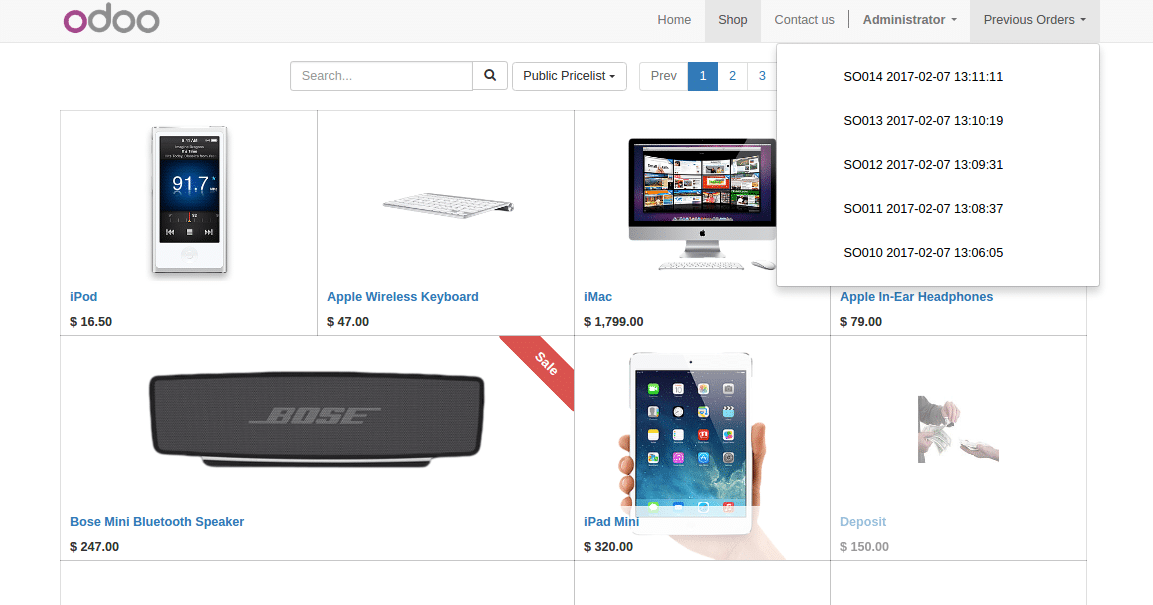 It’s difficult to remember an order by just looking at the sales order number. The customer then clicks on the sales order number, a popup with the list of products ordered appears.
Once they are happy with the order they can click on the RE-ORDER button, and all of the products with the same quantity will be added to the shopping cart automatically.
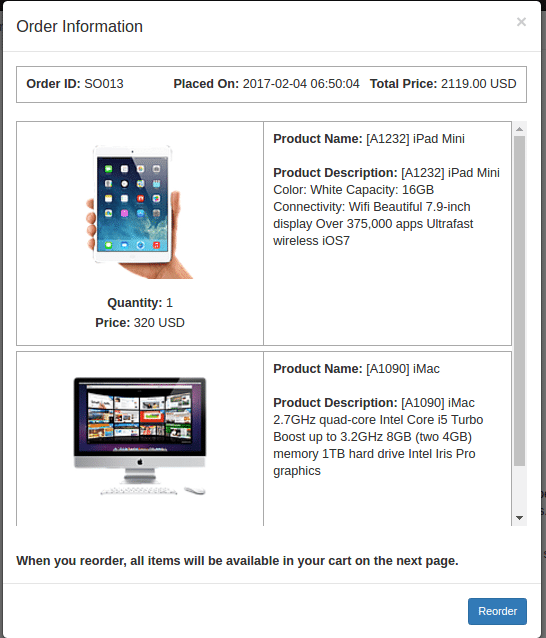
If you want to reduce or increase the quantity of products, you can also add more products to the shopping cart or remove them.
This module is available in Odoo app store.


 English (UK)
 English (United States)
 English (Ireland)
 English (India)