
How to add user in Iredadmin admin panel ?
November 11, 2016
Recent Posts
- Lean Business: How to Reduce Waste and Build More Efficient Processes
- Scariest Business System Nightmares – and How to Banish Them
- The Connected Compliance Problem
- Mind the Digital Gap: Is Your Business Ready for What Comes Next?
- AI Transformation Is a Business Change Challenge, Not Just a Technology Project
Want to make your Microsoft 365 work harder for your business?
and we’ll tailor a solution that’s just right for you.
If you are using Webmail as your email provider and have access through Iredamin and want to know how to use Iredadmin then allow to help us forward.
Follow the following steps to work over them
- login to your www.yourcompany.com/iredadmin
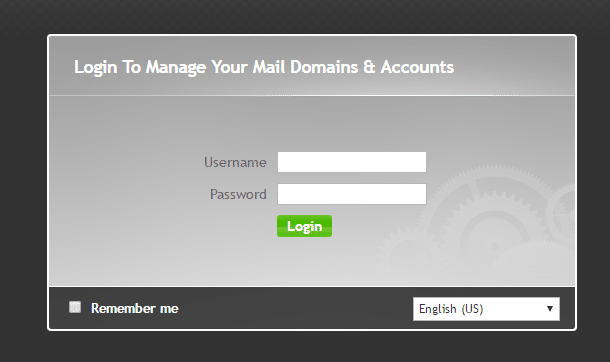
- Enter your username and password, so that you can login
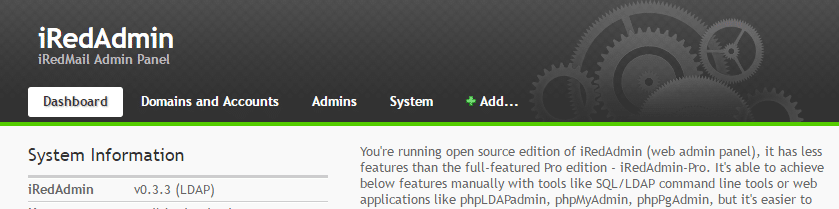
- After that click on “Add”, which will open down down to add user
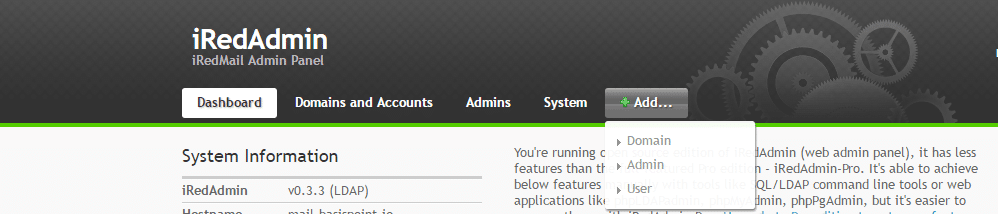
- Once you click on User it will open the below screen
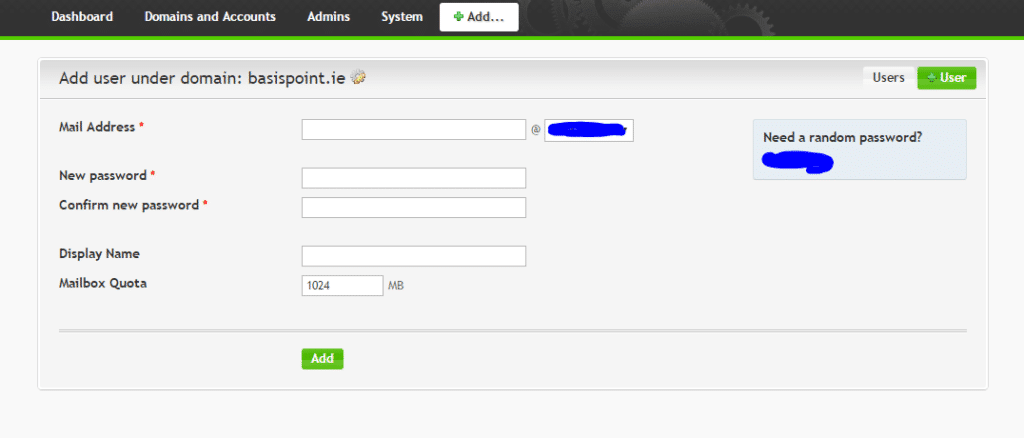
Through this you will be able to add user for your email address.
In case you loved what we are doing than share with your friends and network, also do share your inputs on what all topic we should write for you.
Ciao !!


 English (UK)
 English (United States)
 English (Ireland)
 English (India)