
How to turn off conversation view in Microsoft 365?
October 21, 2016
Recent Posts
- Lean Business: How to Reduce Waste and Build More Efficient Processes
- Scariest Business System Nightmares – and How to Banish Them
- The Connected Compliance Problem
- Mind the Digital Gap: Is Your Business Ready for What Comes Next?
- AI Transformation Is a Business Change Challenge, Not Just a Technology Project
Want to make your Microsoft 365 work harder for your business?
and we’ll tailor a solution that’s just right for you.
While working on Microsoft 365, sometimes you feel the need to view your email as conversations and even at a single entity. Well, in this case, this blog will be a great help.
Below are the steps you need to take to turn Off or On the conversation view in Microsoft 365
- Using a web browser, go to Microsoft 365
- Login to the portal using your Microsoft 365 username and password:User: [email protected]
Password: eID Password - On the landing page, click the “Mail” link or select “Mail” from the list that appears when you click the grid icon in the top-left corner.
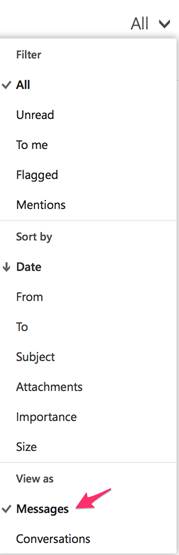
- To turn off the conversation view, click the drop-down arrow next to All in the main Inbox window.
- Click on Messages under “View as.” You can choose how to “Sort by” here also:
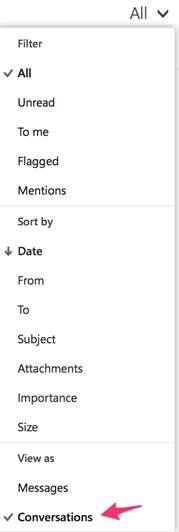
- To re-enable conversation mode, click the drop-down arrow next to All and click Conversations:


 English (UK)
 English (United States)
 English (Ireland)
 English (India)